For coaches, course sellers and agencies

Record it once.
Then let it sell every hour of every day.

Every visitor gets their own start time, their own countdown and their own live-feeling room. An AI assistant answers their questions from a knowledge base you control, then your offer appears on cue.
Your hosting. Your branding. No monthly fee.

Self-hosted · Unlimited webinars · 30-day money-back guarantee
VisaMastercardPayPal30-day guarantee
The part nobody talks about

You already recorded it. So why are you still presenting it?

Every live webinar means doing the same twelve things over again.

✕Pick a date that suits nobody
✕Build the registration page
✕Write the reminder emails
✕Chase the people who forgot
✕Block out the evening
✕Deliver the same 40 minutes
✕Answer the same questions
✕Watch half of them not turn up
✕Upload the replay somewhere
✕Email the no-shows manually
✕Email the people who didn't buy
✕Do the whole thing again next week

So you look at the automated platforms — and they want $99, $200, sometimes $500 a month. Forever. Your registrants land on their domain, in their database, on their terms. Stop paying and your funnel goes dark.


That's why we built it

Four moves, and it's running without you.

01

Add

Upload your MP4, or paste an embed URL if it lives on YouTube or Vimeo.

02

Choose

Pick one of six registration page designs. No page builder, no CSS.

03

Schedule

Recurring daily times, just-in-time sessions, or a fixed date.

04

Switch on

Registrations, reminders, the room, the offer and the follow-up all run themselves.

Six registration designs
Countdown waiting room
AI chat assistant
Per-webinar knowledge base
Scripted timed chat
Live attendee chat
Polls that fire on cue
Timed offer reveal
Per-attendee countdown
Automated email sequences
Replay pages
Full lead analytics
Where every other webinar script stops

Something in the chat box answering objections while the video plays.

An attendee at minute 22 has a question. On every other automated webinar, that question goes nowhere and so do they.

Here, it gets answered in seconds — from the knowledge base you wrote.

  • Answers from your facts onlyIt speaks from the knowledge base you build, so it can't invent a price or a guarantee you never offered.
  • A separate brain per webinarDifferent product, different answers. Nothing bleeds between funnels.
  • Name it whatever you likeIt appears as your assistant, in your tone, under your brand.
  • Every conversation savedRead exactly what each lead asked, on their record in your dashboard.
The AI assistant answering an attendee question in the webinar room chat panel
6 Registration designs, built in

You shouldn't need a page builder to run a webinar.

Six registration page designs are included, each one already wired to the countdown, the timezone handling and the email confirmations. Open the visual picker, click the one you want, and it's live — no CSS, no drag-and-drop, no third-party page tool.

Change your mind later and switch design without touching a single registration you've already collected.

Visual pickerMobile responsiveCountdown built inYour branding
The whole journey

From click to customer, without you in the room.

01
They register

A session that starts in nine minutes.

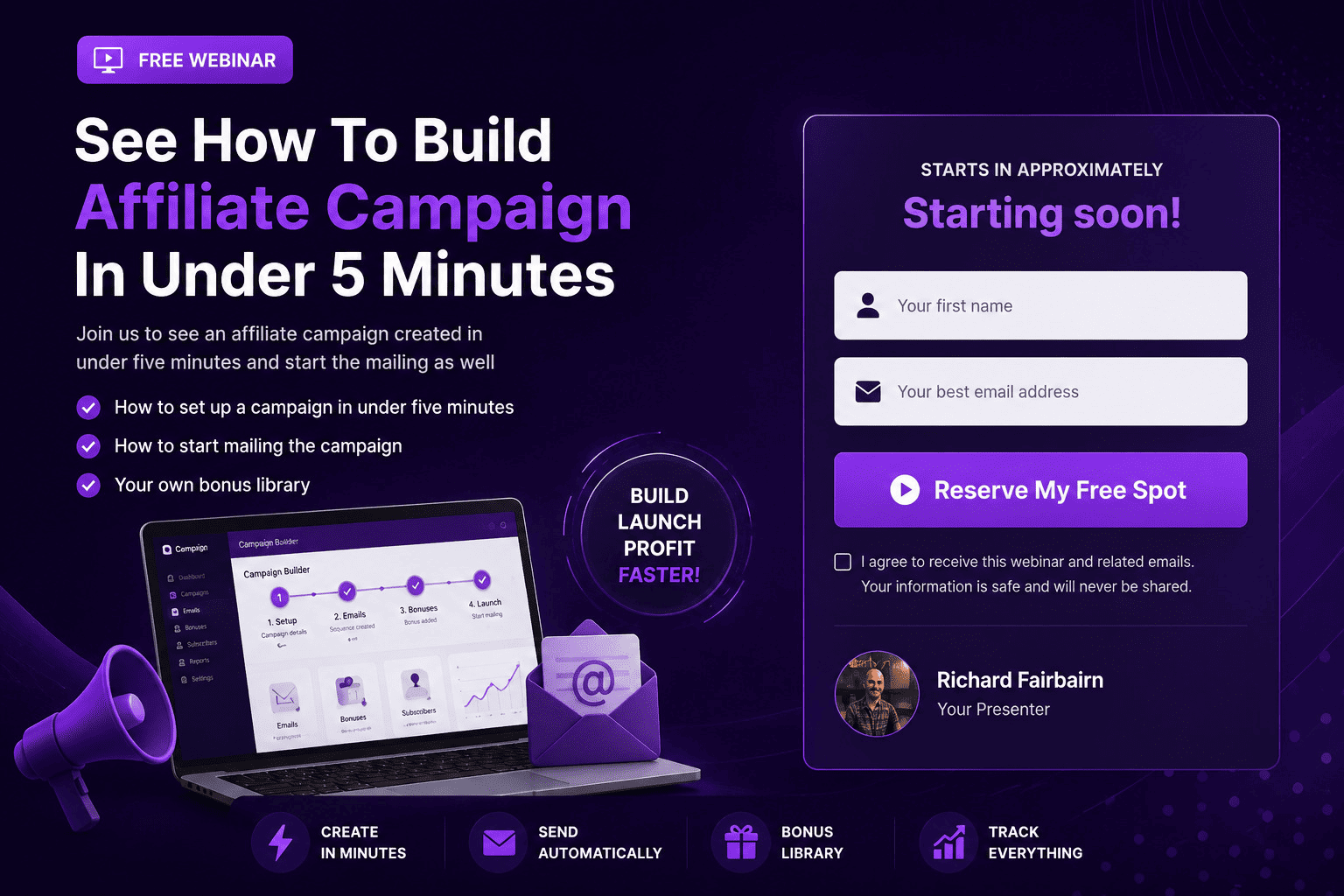
Whenever someone lands, the next session is always minutes away — because the schedule is generated for them. They register, land in a waiting room with a live countdown, and get a confirmation email from your own domain. Fixed dates and just-in-time sessions are both supported if you'd rather run it that way.

Registration page with countdown
02
They attend

A room that behaves like a live event.

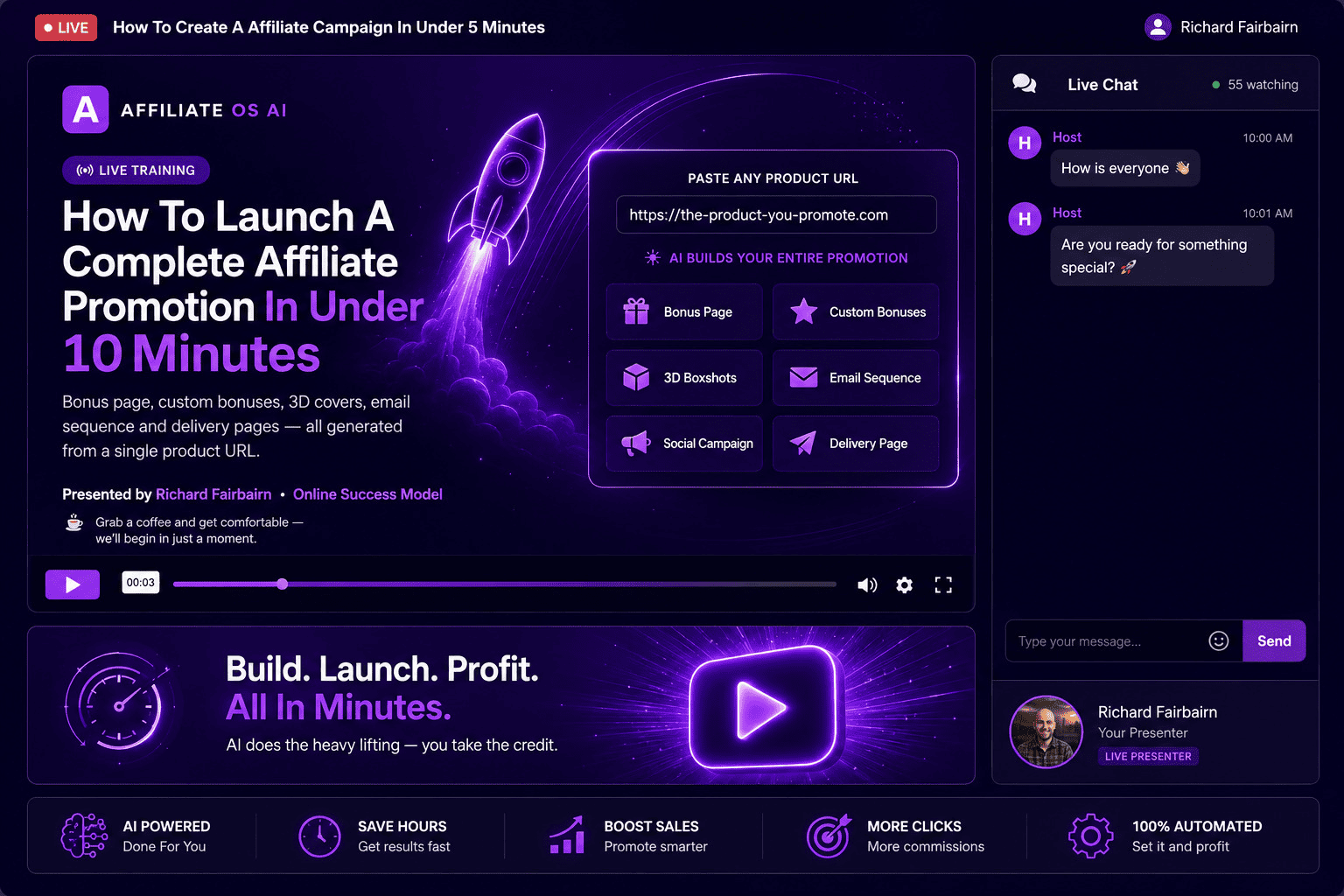
Your video plays at the right offset, so arriving late means joining mid-presentation — exactly as it would live. Chat messages you scripted in advance appear at the moments you chose. Attendees type into the same panel and the AI assistant answers. Polls fire at any timestamp you set, and the answers land on the lead record.

The webinar room with video and chat panel
03
They buy

The offer appears at the exact minute you decided.

Set the timestamp and your product block stays hidden until the video reaches it — then fades in with your banner, product name, benefit bullets and buy button. Add a countdown and the deadline is calculated per attendee, on the server. Refreshing doesn't reset it. Coming back tomorrow doesn't reset it. When it expires you can leave the button or hide it completely.

Product offer block with countdown timer and CTA button
04
They get followed up

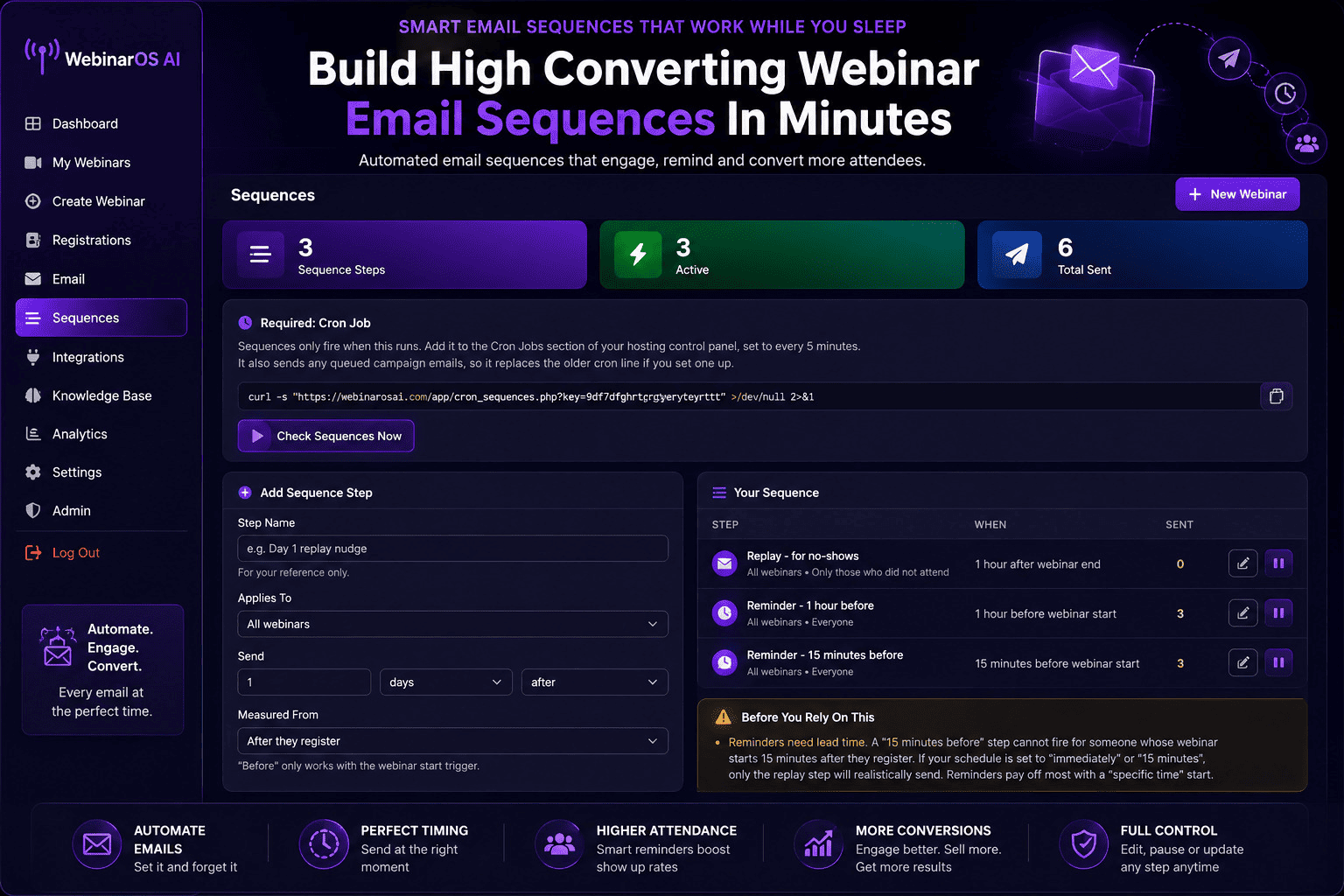
The emails that actually make evergreen work.

Sequences trigger on registration, on webinar start and on webinar end — reminder, replay link, last call, all sending on their own. Broadcast to a segment whenever you want: no-shows, attendees who didn't click, replay watchers. Templates are editable with merge tags, sending runs through your own SMTP from your own domain, and one-click unsubscribe is wired in from the start.

Automated email sequences admin screen
05
You find out what happened

Registrations, attendance, watch time, clicks.

One screen per webinar tells you whether the problem is your traffic, your video or your offer. Watch time shows where people leave. Every lead is filterable and exportable to CSV, with their full chat transcript attached — including everything they asked the AI.

Analytics dashboard
Full walkthrough

See the whole thing working.

A complete demo — building a webinar from an empty dashboard, the room, the AI assistant answering in chat, the offer reveal and the follow-up sequences.

Get Webinar OS AI + claim my White Label access →
One payment · No subscription · 30-day guarantee
Also included

The things you only appreciate on webinar number four.

Speed

One-click duplicate

Copies the AI settings, the entire knowledge base, the scripted chat, the offer timer and the registration design. Swap the video and your second funnel is live in ten minutes.

Reach

Replay pages

For everyone who missed it — with replay views tracked separately, so your follow-up knows the difference between a no-show and someone who watched.

Ownership

Your leads, your database

Every registration lands in MySQL on your server. Filter, search, export to CSV whenever you like. Nobody else holds your list.

Deliverability

Your own SMTP

Sends from your domain through your own SMTP details, so mail lands in inboxes instead of a shared platform's spam reputation.

Compliance

Opt-out handled properly

One-click unsubscribe in every send, opt-outs respected across broadcasts and sequences, and managed from the same leads screen.

Scale

No limits in the software

Unlimited webinars, unlimited registrants, unlimited emails. The only ceiling is your hosting — not a pricing tier.


The honest comparison

Three ways to run an evergreen webinar.

Webinar OS AI Hosted webinar SaaS Zoom + duct tape
CostOne payment$99–$500 / month, forever$15/mo + your Tuesday nights
Runs without youYesYesNo
Where it's hostedYour serverTheirsTheirs
Who owns the leadsYouThemYou, after exporting
AI assistant in chatYesRarely, if at allNo
Number of webinarsUnlimitedTiered by planOne at a time
Your branding, your domainYesExtra, usuallyNo
If you stop payingNothing happensFunnel goes darkFunnel goes dark

At $199 a month, three years of hosted software costs $7,164. Webinar OS AI is one payment, and it's still yours in year four.


Who this is for

Built for people who sell by presenting.

01

Coaches & consultants

Run your discovery presentation on repeat and take calls only with people who've already watched it.

02

Course creators

A permanent launch that doesn't need a launch week — or another live delivery of the same masterclass.

03

Agencies

Set up evergreen webinars for clients and bill for the work. The Agency licence covers exactly this.

04

SaaS founders

A product demo running every twenty minutes, in every timezone, without a sales engineer on the call.

05

Affiliate marketers

Presell the offer properly instead of hoping for a click — with an assistant handling objections in chat.

06

Local business consultants

One recorded pitch, delivered to every prospect in your city, while you're on site with a client.


Limited · Next 30 buyers only

Get White Label rights — and we'll set the whole thing up for you.

You're not just getting a webinar platform for your own funnels. You're getting a rebrandable version with your name, your logo, your branding — and we do the technical work.

Same software · your brand on it
Webinar OS AI

You provide the brand. We handle the setup.

The software, ready to install

You receive the complete Webinar OS AI platform, ready to install and rebrand. Change the name, add your logo, and turn it into a product that represents your business — instead of spending thousands hiring developers to build a webinar platform from scratch.

We install and rebrand it for you

No database setup, no cron jobs, no working out how to rebrand it yourself. Send us your software name, logo and branding details and our team sets up your rebranded version. No complicated installation, no technical headaches, no messing around with code.

No hosting? We'll cover that too

Don't have hosting for your new software? We can host your rebranded installation on our servers, so you don't need to buy hosting or wrestle with server configuration. You get a professionally hosted version ready to use and promote.

Your sales page, rebranded

We won't hand you the software and leave you to work out how to sell it. We'll rebrand this sales page for your product — your name, your logo, your branding — and hand the finished page back to you ready to use. No building, designing or copywriting.

Payment integration, sorted

We'll help integrate your branded version with JVZoo or WarriorPlus so buyers can purchase and get access automatically. Your product, your account, your customers, your sales — we take care of the technical connection.

Your own branded VSL

A sales page needs a sales video. We'll take the Webinar OS AI VSL and create a fully rebranded version using your product name and branding, ready to drop straight onto your new page.

We're limiting this to 30 because of how much hands-on work each setup involves. Once those 30 packages are claimed, the done-for-you White Label offer comes off this page.

And it keeps going after setup

You'll also get access to my White Label Mentorship.

Getting your own White Label software is just the beginning.

New training, added as I create it

I'll personally be adding training videos showing you how to get more from your White Label products, market them effectively and build your own software business. As I find new strategies and new ways to generate sales with White Label software, the training goes straight into the mentorship area for you.

Discounts on future White Label releases

Whenever we release new White Label software and opportunities, mentorship members get exclusive discounts — so you can add more products to your business without paying the normal price.

Walkthroughs for this platform specifically

How to structure a webinar that converts, what to put in your AI knowledge base so the assistant is actually useful, how to time your offer reveal, and which follow-up sequences to run. The setup decisions that make the difference between a webinar that sells and one that just plays.

The rest of the White Label community

You're not the only person building a software business this way. Mentorship members are working through the same decisions — pricing, positioning, launch timing — and that's where those conversations happen.

So you're not simply getting Webinar OS AI. You're joining an ongoing White Label community with new training, new strategies and special pricing on what comes next.

Build your first White Label product with us — then keep building from there.

Everything included

Lock this in before the White Label spots are gone.

Webinar OS AI — platform, registration designs, email template pack, training and bonus resources

Here's what you get

Full platform access, plus the done-for-you White Label package

Webinar OS AI — full unlimited licence

Unlimited webinars, unlimited registrants, installed on your own hosting.

$297
The AI assistant & knowledge base builder

The feature no other webinar script in this market includes.

$197
White Label software rights

Install it as your own app, rebrand it, and keep 100% of any sales you make.

$997
Full install, setup and rebrand

We do the technical work for you. Limited to 30 spots.

$497
Sales page rebranded for you

We rebrand this page for whatever name you choose. Limited to 30 spots.

$297
Branded video sales letter

We create your VSL in the branding of your new app. Limited to 30 spots.

$197
Priority support

We're with you at every step and hand back your finished done-for-you account.

$197
White Label Mentorship access

Ongoing training as I create it, plus member discounts on future White Label releases.

Included
Total value $2,482
$247

One payment · No subscription

Get Webinar OS AI + claim my White Label access →
30-day money-back guarantee · Instant access
VisaMastercardPayPal
30Day

Try it risk free for 30 days

Get access, install it, and put a real webinar through it. If within 30 days you decide Webinar OS AI isn't right for you, contact us and request a refund in accordance with our refund policy.

There's no need to sit on the fence — set up the webinar you've been putting off and see what it takes off your plate.

Questions

Frequently asked

What is Webinar OS AI?

A self-hosted evergreen webinar platform. You upload one recorded video and it handles registration pages, scheduling, the waiting room, a live-feeling webinar room with chat, your timed offer, replay pages and all the follow-up email — automatically, around the clock.

Do I have to install anything myself?

No. We set it all up for you — installation, database, cron jobs, SMTP and your AI assistant configuration. You get a working platform handed back to you, ready to build your first webinar in.

Will it run on my hosting?

Almost certainly — it's plain PHP and MySQL with no framework and no unusual server requirements, so if your host runs WordPress it runs this. Send us your hosting details and we'll take care of the setup. If you don't have hosting, we can host it for you.

Do I need to know how to code?

No. There's no code to touch at any point. Everything is done from the admin panel, and the technical setup is handled for you before you ever log in.

How does the AI assistant work?

You build a knowledge base for each webinar — questions and the answers you want given. When an attendee types a question in chat, the assistant finds the relevant entries and replies from them, so it answers with your facts rather than making things up.

Is the AI assistant an extra cost?

The feature is included. It connects to your own Anthropic account and Anthropic bills you directly for usage — typically a very small amount per question. We don't mark it up because we're not in the middle of it. You can also run the platform with the assistant switched off entirely.

Can I use my own domain and branding?

Yes. It's your installation on your domain with your logo and colours. Nothing points back to us.

How many webinars can I run?

As many as you want, with as many registrants as your hosting will carry. There are no limits written into the software.

Does my video have to be uploaded?

No. Upload an MP4 to your own server, or paste an embed URL if it's already on YouTube, Vimeo or anywhere else.

What scheduling options are there?

Recurring daily session times, just-in-time sessions that start a few minutes after someone lands, or a fixed date and time. You can change it per webinar.

Does it send the emails too?

Yes. Sequences trigger on registration, on webinar start and on webinar end, and you can broadcast to a segment at any time. Templates are editable with merge tags and everything sends through your own SMTP.

Do I need a separate autoresponder?

No. The email system is built in, including the queue, the sequences and one-click unsubscribe. If you'd rather push leads to an existing autoresponder, you can export them at any time.

Does the countdown timer actually work properly?

Yes. The deadline is calculated per attendee on the server and anchored to when the offer appeared for them — so refreshing the page or coming back later doesn't reset it. As with any urgency mechanism, use a genuine offer window.

Can I see who attended and for how long?

Yes. Registrations, attendance, watch time, buy-button clicks and replay views are tracked per webinar, and every lead is exportable to CSV with their chat transcript attached.

Can I run more than one product through it?

Yes. Duplicate any webinar in one click — it carries the AI settings, knowledge base, scripted chat, offer timer and registration design with it. Swap the video and you have a second funnel.

What's included with the White Label offer?

For the next 30 buyers, you receive a version of Webinar OS AI that can be rebranded with your own product name, logo and branding — plus the full done-for-you setup.

Will you help me install my White Label version?

Yes. We install and configure your rebranded version so you don't have to deal with the technical setup.

What if I don't have hosting?

We can host your rebranded installation on our servers, so not having your own hosting doesn't stop you getting started.

Do I get a sales page for my White Label version?

Yes. We rebrand this sales page with your product branding and hand the finished page back to you ready for launch.

Will you help with JVZoo or WarriorPlus?

Yes. We help set up the payment integration for your rebranded app so you can sell through your own account.

Do I get a VSL for my rebranded product?

Yes. We create a branded version of the VSL for your new software, ready to use on your rebranded sales page.

Is the White Label offer available to everyone?

No. Because of the hands-on work involved in installation, rebranding and setup, we're limiting the done-for-you White Label package to the next 30 buyers only. Once claimed, it's removed.

What is the White Label Mentorship?

Ongoing access to training I add as I create it — how to market your White Label products, get more from them and build a software business around them. Members also get exclusive discounts on future White Label releases.

Is my purchase protected?

Yes. Your purchase is covered by our 30-day money-back guarantee, subject to the terms of our refund policy.

How do I get started?

Click the order button and secure your access. If you're one of the next 30 buyers you'll also secure the done-for-you White Label package while spots remain.

There's a webinar you've been meaning to set up for months.

You know it would sell. You just don't want to run it live every week for the rest of your life, and you don't want to hand a few hundred a month to a platform that keeps your list.

Record it once. Set it up this week. Then leave it running.

Get Webinar OS AI + claim my White Label access →
Only 30 White Label spots — once they're gone, they're gone
WebinarOSAI